Start with one photograph you actually want
A useful first goal is a clear photograph of your baby’s face that you would enjoy looking at years from now. You do not need a nursery makeover, a complicated costume, or a collection of poses. Choose whether today’s picture will show an everyday cuddle, an open-eyed expression, or a quiet view of the crib.
Write the intention in a short phrase: “Mum meeting those curious eyes” or “the little face we see each morning.” This gives you something concrete to compose around. Without a goal, it is easy to take fifty pictures while changing everything and still feel unsure which one works.
If you want photographs for editing, add a second goal: show the face clearly, without hair, clothing, or someone else’s hand covering important features. Everyday memories and source photographs can come from the same short session.
Set up the room before bringing the baby over
Choose a spot where you can see comfortable, even light on an adult’s face. Stand there yourself and take a test picture of another grown-up or an ordinary object. If one half looks bright and the other disappears into shadow, try a slightly different angle.
Put distracting laundry or packaging outside the frame. You only need to tidy the part the camera sees. Keep a phone charger, drinks, and anything dangling away from the baby’s area. Have the phone ready before your helper settles with the baby.
For a sleeping photograph, keep the baby on their back in a compliant infant sleep space with a firm, flat, level surface and fitted sheet only, following NIH safe-sleep guidance. Do not build a photographic nest. For an awake cuddle, the holding adult should support the head, as SickKids explains.
Give each adult a clear job
One person holds and watches the baby. The other takes photographs. Ask the holding adult to remain comfortable instead of twisting toward the camera. You can move a few steps more easily than they can rearrange a baby. If you are alone, concentrate on ordinary moments you can photograph while your baby is already safely settled; save held portraits for when another adult can help.
Use simple camera controls
Begin in the phone’s ordinary Photo mode. Wipe the lens with a suitable clean cloth. Use the rear camera when a second adult can take the picture, and start with the normal view rather than an extreme wide view.
Tap the baby’s face on the screen and take a test image. On iPhone, tapping changes the focus area and the adjacent exposure control adjusts brightness; Apple documents both in its camera tools guide. Your phone’s controls may look different, so find the equivalent in its camera app.
Check the result rather than trusting the live preview. Can you see the eyes or eyelashes clearly? Is there detail in the cheeks? Does the clothing still have visible texture? If the face looks washed out, reduce brightness slightly and try again. You are aiming for a readable face, not the brightest possible picture.
Keep the phone securely in your hands and outside the baby’s space. Do not suspend it above the baby. Choose a side angle you can reach comfortably without leaning over the crib rail.
Make three compositions before changing anything
A small set becomes more interesting when the framing changes thoughtfully. Keep the baby comfortable and vary your own position.
- The portrait: Include the whole face, the top of the head, and a little surrounding space. Let the expression lead the picture.
- The relationship: Step back enough to include the caregiver’s face and arms. A glance toward the baby often feels more personal than everyone looking at the lens.
- The detail: Photograph a small hand resting naturally against an adult’s finger, or a little foot visible during an ordinary cuddle. Do not reposition fingers or feet to manufacture a shape.
Take both a vertical and horizontal version when that can be done easily. A vertical picture might fit a frame you already own; a horizontal one might suit a family album page. Leave some breathing room around the head so later cropping has options.
A realistic five-picture example
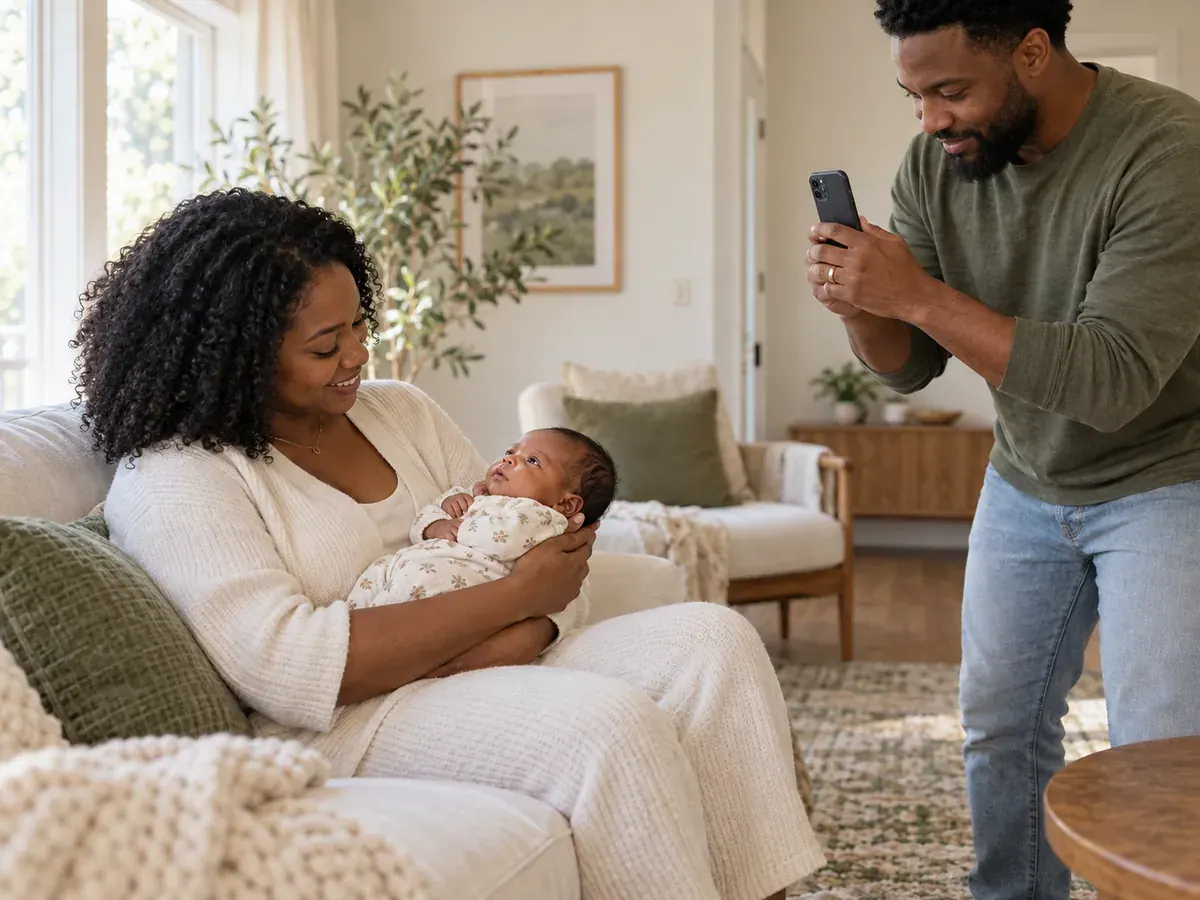
Imagine a parent seated beside a window, comfortably holding an awake newborn. A second adult stands a little to one side, with the window behind the photographer’s shoulder rather than directly behind the baby.
The first picture includes the parent and baby. The second moves closer to show the baby’s face. The third waits for the parent to look down. The fourth includes the baby’s hand against the parent’s sleeve. The fifth repeats the clearest face view horizontally.
Nothing about the baby’s position needs to change. If a hand drifts across the face, wait for an ordinary movement or keep that photograph as a candid memory. A clear upload image can happen another time. This example is a starting point, not a sequence you have to complete.
Review while the setup is still available
Open two or three photographs at full size. Enlarge the face enough to judge clarity. Delete accidental screenshots later; right now, mark the strongest pictures as favourites so you can find them without searching a long camera roll.
If every image has the same problem, change one thing. Move your camera position if the background is distracting. Retake the photograph in better available light if the face is muddy. Move back slightly if you cut off the top of the head. Changing one variable makes it easier to understand what helped.
Keep the original files. Avoid strong beauty filters, decorative stickers, or tightly cropped exports when you intend to send photographs to an editor. Those choices can be added to a copy later. Read the photo guidelines before selecting an upload collection.
Frequently asked questions
Do I need a new phone to take newborn pictures?
Start with the phone you already have. Make a test portrait in comfortable light and inspect the face. A clean, well-framed source image is a more useful immediate goal than shopping for a device before you know what problem you need to solve.
Does my baby need to be asleep?
No. Awake expressions can make lovely portraits and useful source photographs. Plan around the moment your baby offers. There is no need to keep a baby awake beforehand or interrupt feeding to obtain a particular expression.
Should I use Portrait mode?
Try it on a copy of the moment if you like the effect, but also take a standard photograph. Compare the edges of the face, hair, and clothing. Choose the version that keeps those details looking natural instead of assuming one mode is always better.
What if I only get two good photos today?
That is still a successful session. Keep them and return another day if you want a larger collection. Baby Lovin’s newborn workflow asks for 10–15 photos, so you can build your selection from several calm opportunities rather than finishing everything at once.
Use the window-light guide to refine your setup, and the 10–15 photo checklist to assemble a varied upload collection.
When you are ready, explore the newborn studio and see how it works. Baby Lovin’s human team works from your uploaded photographs; straightforward originals give that conversation a useful starting point.
Sources